
Amazon Request a Review Tutorial

On Amazon FBA orders 5-30 days old, you can now navigate to your Seller Central ORDERS page, then click any ORDER ID number within this time frame, and then click the REQUEST A REVIEW button on each order page:
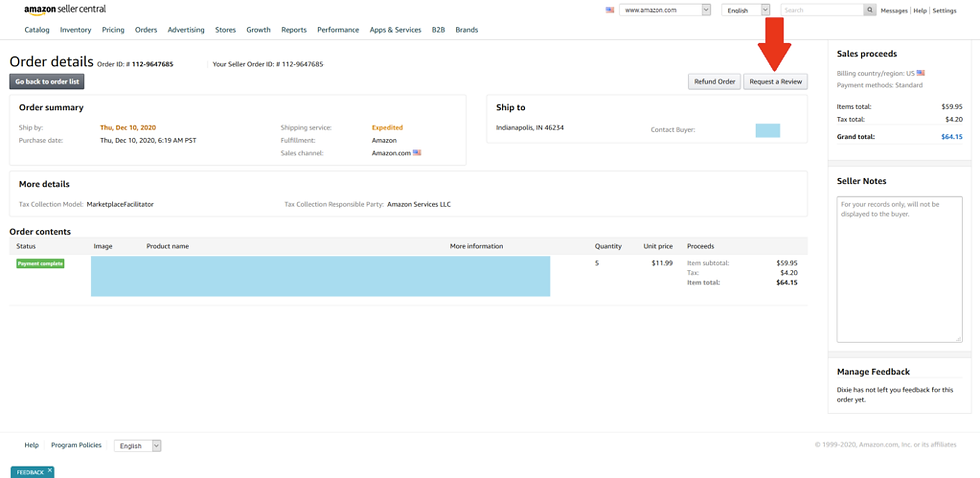
This is the manual option for requesting reviews on your Amazon orders. We prefer the automated review request software Salesbacker: https://www.coursenvy.com/salesbacker
Jungle Scout has also implements a “Bulk Request Review” feature as part of their Jungle Scout Chrome Extension.
What makes Escape Road City 2 fun for me is the constant need to change direction. Traffic Racer has a similar focus on road awareness, but the police pursuit adds another layer of pressure here.
Marketplace reviews and buyer feedback always remind me that ecommerce works best when order records are easy to find. When I buy or sell online, I keep message history, tracking numbers, payment notes, and return details in one place because even small questions are easier with proof nearby. If a seller message, return case, payment hold, delivery update, refund status, or feedback question needs platform support, I opened how to contact ebay once I had the item number, payment record, and message history ready. That felt more natural than starting with a vague search and then trying to remember what happened. For marketplaces, good support usually begins with the item number, date, payment method, screenshots, and a clear reason for the…